Juliane Script Font: Practical Ways to Use It in Real Design Workflows
Typography choices often determine how a design lands with its audience. A script font can bring warmth, personality, and a handcrafted feel—but only when used with intention. Juliane, a script font designed by Byuly Ayika, offers a distinctive balance of elegance and readability. It is not just another decorative typeface. It is a practical tool that fits into branding, content creation, marketing, and personal projects when you understand how to integrate it into your workflow.
This article explains what Juliane is, where it fits in a broader design process, and how you can implement it across different types of work—whether you are a designer, entrepreneur, marketer, educator, or hobbyist. The focus is on practical use, preparation, compatibility, and long-term consistency.
What Is Juliane and Where Does It Fit?
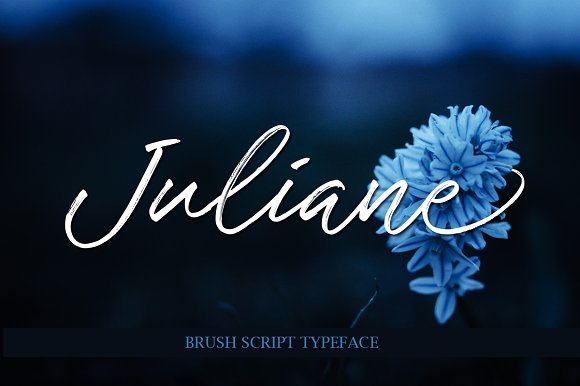
Juliane is a script font that combines flowing letterforms with clear, legible contours. It is not overly ornate, which makes it suitable for both display use and body text in certain contexts. The font carries a refined, feminine character without sacrificing structure. Because it avoids excessive flourishes, it works well in professional settings where you still want a human touch.
In a broader design process, Juliane fits into the visual identity and content presentation stage. You might select it after you have defined your brand voice or content goals but before you finalize layouts and production files. It can serve as a primary heading font, a accent typeface for quotes or callouts, or even a supporting style for invitations and social media graphics. Its versatility means it can be used before a project starts (during mood boarding and style scouting), during the production phase (as you build templates and assets), and after the launch (when you maintain brand consistency across materials).
How Juliane Interacts with Other Tools and Assets
No font works in isolation. Juliane interacts with your broader toolkit, including design software, brand guidelines, color palettes, image styles, and other typefaces. Understanding these interactions helps you avoid common mismatches.
Software Compatibility
Juliane is a standard font file that works across major design applications—Adobe Illustrator, Photoshop, InDesign, Canva, Affinity Designer, and even web-based tools like Figma or Webflow. Before integrating it into a project, verify that the format (.otf or .ttf) is supported by your platform. For web use, check if the font license includes web embedding or if you need to convert it for @font-face use. This preparation step saves time later.
Pairing with Other Fonts
Because Juliane is a script font, it pairs most effectively with clean, neutral typefaces. Sans-serif fonts like Open Sans, Lato, or Inter create a clear contrast. Serif fonts such as Playfair Display or Merriweather can work if you maintain hierarchy and avoid visual clutter. A good rule is to use Juliane for headlines or emphasis, and a simpler font for body copy. This combo gives your work a structured yet expressive feel.
Color and Image Integration
Script fonts tend to shine against solid backgrounds or subtle textures. Busy images behind Juliane text can reduce legibility. If you are using it on a photograph, place it in a clear area or add a semi-transparent overlay. Dark, rich colors—like deep navy, burgundy, or charcoal—often complement the elegance of the font. For lighter projects, soft pastels or white space keep the script readable.
Practical Use Cases Across Different Workflows
Juliane is not limited to one type of project. Here are several real-world scenarios where the font adds value without complicating your process.
Branding and Identity Projects
When building a brand identity, Juliane can serve as the primary logotype font for businesses in fashion, beauty, wellness, stationery, or hospitality. Its flowing lines suggest approachability and quality. Replace a generic serif or sans-serif logo with Juliane if you want to shift the brand tone toward warmth and personal connection. For brand guidelines, note the font weight, spacing, and minimum size to ensure consistency across business cards, letterheads, and digital assets.
Social Media Content
Social media relies on fast visual impact. Juliane works well on Instagram posts, Pinterest pins, and Facebook covers where you need a headline that draws the eye. Use it for quotes, announcements, or product names. Keep the text short—three to six words—so the script remains readable on mobile screens. Pair the font with a consistent color palette and a secondary sans-serif for captions. This creates a recognizable feed aesthetic without extra effort.
Invitations and Event Materials
For weddings, parties, webinars, or launch events, Juliane adds an elegant, handcrafted feel. You can use it for invitation headers, RSVP cards, and thank-you notes. Because the font is legible, guests will not struggle to read details like dates and locations. Combine it with a simple layout and minimal ornamentation. This approach saves design time while still delivering a polished result.
Educational and Instructional Materials
Educators and trainers often need materials that feel engaging but remain clear. Juliane can be used for section titles, pull quotes, or decorative elements in worksheets, slide decks, or handouts. For main content, stick with a standard sans-serif font. The script adds visual variety without overwhelming the instructional purpose. This is especially useful for topics related to creativity, language arts, or design education.
Personal Projects and Hobbies
If you are working on a personal blog, journal, or creative portfolio, Juliane can define your visual style. Use it for your site header, post titles, or about page headings. It gives a distinct personality without requiring advanced design skills. Pair it with a simple layout and high-quality images to let the typography lead the design.
Implementation Tips for Smooth Integration
Getting a font into your workflow is straightforward, but using it well requires attention to detail. These tips help you avoid common issues and maintain quality.
Preparation Before Using Juliane
- Check licensing: Confirm whether the font is free for personal use, commercial use, or both. If you plan to use it in client work or products, purchase the appropriate license from the designer or distributor.
- Test legibility at different sizes: Open the font in your software and test it at 12pt, 24pt, 48pt, and 72pt. Notice how the letterforms behave at small sizes. Script fonts often lose clarity below 14pt, so plan accordingly.
- Set up a style guide: Before you start designing, decide exactly how you will use Juliane: which sizes, which colors, and which pairings. Document this in a simple brand style sheet or a note in your project file. This prevents inconsistency later.
During the Design Process
- Adjust tracking and kerning: Script fonts sometimes need manual spacing adjustments, especially between specific letter pairs like "V" and "a" or "w" and "h". Take a few minutes to kern headlines for a polished look.
- Limit the number of fonts: Use Juliane in one or two roles—like headings and decorative accents—and no more than one additional font for body copy. Too many typefaces create visual noise.
- Use consistent line height: For multi-line headlines in Juliane, set a line height that prevents descenders from colliding with the line below. A value of around 1.2 to 1.4 times the font size usually works.
After the Project Is Finalized
- Package font files properly: If you send design files to clients, printers, or collaborators, include the font file (with the license) or outline the text. This avoids missing font errors.
- Create reusable templates: Save a few template files using Juliane for common formats—social media posts, presentations, or flyers. This speeds up future projects and ensures consistency.
- Review across devices and platforms: If you use Juliane on a website or digital publication, test it on desktop, tablet, and mobile. Fallback fonts should be specified in your CSS so the layout remains intact if the file does not load.
Maintaining Consistency and Quality Over Time
Long-term use of any font requires attention to how it ages across projects. Juliane is not a trend font—it has a classic script structure that remains relevant. However, consistency matters more than novelty. If you use Juliane for a brand or series of materials, keep a master file of approved styles, color codes, and usage examples. Update this document whenever you make a design decision.
For recurring tasks—like weekly social media graphics or monthly newsletters—create a template that locks in the font placement, size, and pairing. This removes the need to redecide each time. It also ensures that even if someone else on your team produces content, the visual identity stays intact.
Quality control also involves reviewing how Juliane renders in different contexts. Print and screen look different. A font that appears crisp on a monitor may lose detail in print at small sizes. Always request a physical proof before printing large quantities, or test on a high-resolution screen before publishing online.
Observations on Workflow Efficiency
From a process perspective, script fonts like Juliane can either streamline your work or add friction—depending on how you prepare. The key is treating the font as part of your system, not an isolated decoration. When you integrate it early—during mood boarding or template creation—it becomes a natural element that coordinates with your other choices. If you add it late, you may find yourself adjusting colors, images, and layouts to match.
One practical observation: script fonts reduce the need for extra decorative elements. A single headline in Juliane often carries enough visual weight that you can avoid using borders, icons, or background patterns. This simplifies your layout and saves design time. You end up with cleaner files that are easier to edit and repurpose.
Another observation: consistency across team members improves when you centralize font use. If you work with freelancers, agencies, or internal staff, share a simple style guide that shows exactly how Juliane should be used. Include an example of a good pairing, a bad pairing, and a note on minimum size. This prevents design drift and keeps the brand recognizable.
Final Thoughts on Making Juliane Work for You
Juliane script font by Byuly Ayika is a practical choice for anyone who wants to bring a refined human touch to their work without sacrificing clarity. It fits into branding, content creation, social media, events, education, and personal projects. The font works best when you treat it as part of a system—paired with clean typefaces, consistent colors, and intentional spacing.
By preparing your file setup, testing legibility, documenting your style choices, and creating reusable templates, you can use Juliane efficiently across many projects. It is not a font that requires constant adjustment. Once you define its role in your workflow, it becomes a reliable asset that strengthens your designs over time.
Whether you are designing for a client, building a personal brand, or creating materials for your business, Juliane offers a balance of elegance and practicality that fits naturally into real work.