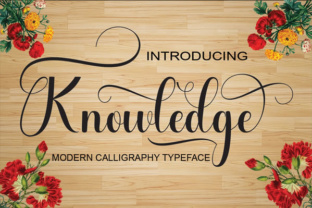
Knowledge: A Script Font for Practical Workflows
When you are building a project—whether it is a brand identity, a website, a printed brochure, or even a social media campaign—the typeface you choose does more than carry words. It sets the tone, guides the reader's eye, and communicates something about the intention behind the content. Among the many script fonts available today, Knowledge by Naldy Studio stands out because it was designed with real use in mind. It is not just a decorative layer; it is a practical tool that fits naturally into both planning stages and final execution.
This article walks through what Knowledge is, where it fits in a broader design or content process, and how you can integrate it into your own workflows without forcing it. Whether you are a marketer preparing a campaign, a freelancer building client materials, or a small business owner handling your own branding, the goal is to help you use this font with intention and efficiency.
What Knowledge Brings to Your Toolkit
Knowledge is a script font with a varying baseline. Unlike mechanical scripts where each letter sits on a uniform line, this font allows characters to rise and fall in a natural, handwritten rhythm. The result is a smooth, fluid look that feels personal without being chaotic. Naldy Studio designed it to work for both formal and informal projects, which makes it more versatile than many script faces that lean heavily into one style.
From a workflow perspective, this matters because you do not need to switch between multiple script fonts for different tones. A single typeface can handle a wedding invitation, a product label, a newsletter header, or a motivational quote on Instagram. That reduces the time spent browsing and testing, and it simplifies your asset library over time.
Another practical detail: the font includes both uppercase and lowercase characters, numerals, and punctuation. That means you can use it in actual body copy or short paragraphs, not just for large headlines. When you plan a layout, you have more flexibility because the font does not break down at smaller sizes or lose readability.
Where Knowledge Fits in a Design or Content Process
Every project follows a kind of arc. There is a preparation phase, a creation or execution phase, and a refinement phase. Knowledge can be useful at each stage, but the way you use it should shift depending on where you are in the process.
Before You Start: Preparation and Planning
In the early stages of a project, you are gathering elements, sketching ideas, and making decisions about visual direction. This is where you test fonts against your content. Load Knowledge into your design software and set a few sample phrases. Look at how the varying baseline affects the flow of specific letter combinations. For example, words with tall ascenders like "l" or "h" will rise, while descenders like "g" or "y" drop below the line. This creates a dynamic texture that works well when you want the text to feel organic rather than rigid.
During planning, also consider the platform. Knowledge works on both print and digital, but the rendering can differ slightly. On screen, especially at small sizes, you may need to adjust tracking or line height to maintain legibility. Testing early prevents surprises later when you are under a deadline.
During the Project: Execution and Integration
Once you move into the active creation phase, Knowledge becomes part of your layout decisions. Because it is a script font, it pairs best with clean, neutral typefaces. A common workflow is to use a simple sans-serif for body text and reserve Knowledge for headings, pull quotes, or accent words. This gives you contrast without competing styles.
For example, if you are designing a flyer for a local event, you might set the main headline in Knowledge at about 36 points, then use a regular sans-serif like Open Sans or Lato for the details. The varying baseline in the headline draws attention and feels hand-lettered, while the supporting text remains easy to scan. This approach also works for email headers, landing page hero sections, and presentation titles.
If you are working on a longer document or a multi-page layout, think about consistency. Use Knowledge for the same type of element across every page—all section headers, for instance. That creates a rhythm and makes the document feel cohesive without requiring a lot of extra styling effort.
After Completion: Quality Control and Refinement
After you place your text, go back and review it with a critical eye. Look at kerning pairs, especially where two script-style letters meet. Some combinations may need manual adjustment to avoid awkward gaps or overlaps. Most design software allows you to adjust letter spacing for specific pairs, so take a few minutes to fine-tune the most visible words.
Also test the font in its final output format. If you are sending a PDF for print, check that the font is embedded. If you are using it on a website, verify that the web font files load correctly and that fallback fonts are chosen carefully. A script font that fails to load can break the entire visual hierarchy of a page.
Practical Implementation Tips for Different Use Cases
Script fonts are sometimes treated as specialty items, but Knowledge is built to be used more broadly. Here are a few specific workflows where it fits naturally.
Branding and Identity Projects
When developing a brand, consistency is the goal. Knowledge can serve as the accent typeface—the one that appears on business cards, social media profile headers, and product packaging. Because it has both formal and informal qualities, it works for brands that want to feel approachable but not casual to the point of being unprofessional.
Create a brand guideline document that specifies where Knowledge should be used and where it should not. For example, it might be reserved for the tagline or for specific product names, but not for addresses or legal text. Setting those boundaries early saves time when you or other team members are producing assets later.
Social Media and Digital Content
Social media posts benefit from text that stands out in a busy feed. Knowledge works well for quote graphics, announcement images, and story overlays. Because it is a smooth script, it pairs nicely with photos that have negative space. On Instagram, try using it for the main text in a carousel post, then use a clean sans-serif for the bullet points or supporting details.
For video content, consider using Knowledge in lower-thirds or title cards. The varying baseline adds visual interest without requiring animation or heavy effects. Keep the text on screen long enough to be read, and avoid setting too many words in script at once.
Print Materials and Stationery
Print is where script fonts traditionally shine, and Knowledge is no exception. Wedding invitations, thank-you cards, menus, and certificates all benefit from the handcrafted feel. When preparing print files, pay attention to the weight of the font. If you are printing on textured paper, choose a slightly heavier weight if available, or increase the font size to compensate for ink spread.
Also test how the font looks in monochrome versus color. Some script fonts lose their character when printed in a single color, but the varying baseline of Knowledge helps it retain flow even without color variation.
Working with Knowledge Alongside Other Tools and Resources
No font works in isolation. How you combine Knowledge with other elements determines the overall quality of your output. Here are a few factors to keep in mind.
Compatibility with Design Software
Knowledge is available in standard formats like OTF and TTF, so it works with Adobe Creative Suite, Canva, Affinity products, and even web-based tools. If you are using a platform like Canva, you can upload the font directly and apply it to any text element. For web use, use a service like Google Fonts or self-host the files with proper @font-face declarations.
If you work with a team, make sure everyone has access to the same font files and that they are installed on all relevant machines. A mismatch in font availability can cause layout shifts or missing text when files are shared.
Pairing with Other Typefaces
Stick with one or two supporting typefaces maximum. A clean sans-serif like Montserrat or Lato works well. Avoid pairing Knowledge with another script font—it creates visual clutter and competes for attention. The goal is contrast: the script provides personality, the sans-serif provides structure and readability.
Organization and Asset Management
If you accumulate fonts over time, organize them in a way that makes retrieval fast. Tag Knowledge with categories like "script," "handwritten," "formal," and "versatile." This helps when you are searching for the right font under deadline pressure. Also keep a test document with sample sentences in various sizes and colors, so you can preview how Knowledge behaves before committing to it in a project.
Long-Term Use and Consistency
A font that you use repeatedly across projects builds familiarity. Over time, you learn which letter combinations need attention, how the font looks at different scale, and which contexts bring out its strengths. That kind of knowledge is valuable because it speeds up your workflow. You stop guessing and start placing text with confidence.
For businesses and creators who produce ongoing content, using the same accent font across campaigns creates a subtle visual thread that ties materials together without being obvious. If a customer sees your product label, then later sees a social post with the same font, the connection registers unconsciously. That is the kind of consistency that builds recognition over time.
Keep in mind that scripts can feel trendy. To avoid your materials looking dated too quickly, use Knowledge in moderation. Let it be the accent, not the foundation. That way, when design trends shift, your core branding remains flexible while the script element can be updated without a total overhaul.
Final Thoughts on Integrating Knowledge into Your Routine
Choosing a font is a small decision in the grand scope of a project, but it has a ripple effect. Knowledge offers a practical blend of style and utility that fits into real workflows—from the initial planning sketch to the final quality check. Its varying baseline adds natural flow without sacrificing legibility, and its range of formality means it can adapt to different contexts without requiring a separate typeface for each one.
When you add Knowledge to your collection, spend an hour testing it in your most common tools. Run through a typical project from start to finish: draft a headline, pair it with body text, check how it looks on screen and on a test print. That hands-on experience will tell you more than any description can. It will also reveal the small adjustments that make the font work best for your specific needs.
Whether you are designing for yourself or for clients, the goal is not to find a font that does everything. It is to find a font that does one thing well and fits into your process without friction. Knowledge is one of those fonts. Use it where it adds value, keep it consistent where it matters, and let the rest of your work carry the message.