Wolfband: A Modern Handwritten Calligraphy Font for Practical Workflows
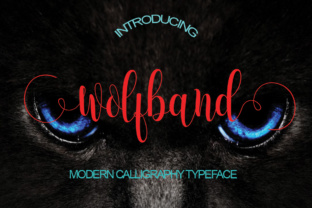
Choosing the right typeface is often a decision that ripples through an entire project. It affects readability, tone, and the time you spend on revisions. Wolfband, a modern handwritten calligraphy style font created by StudioRz, offers a balance between expressive character and functional usability. Because it is PUA encoded, you gain direct access to alternate glyphs and ligatures without needing specialized software workarounds. This makes it a practical option for anyone who needs a handcrafted look without sacrificing control during production.
What Wolfband Brings to a Project
Wolfband sits in the category of script fonts that mimic natural handwriting, but with a polished consistency. The strokes have a fluid, slightly informal feel, which works well when you want to convey warmth or creativity. Unlike many handwritten fonts that require extensive manual adjustments, Wolfband’s PUA encoding lets you insert swashes, stylistic alternates, and contextual ligatures directly from the glyph palette in most design applications.
This encoding matters because it streamlines your workflow. Instead of copying and pasting special characters from a separate document or using a character map, you can toggle between variants as you type. For someone juggling multiple assets—logos, social media templates, print collateral—that efficiency adds up. You spend less time hunting for the right letterform and more time refining the overall composition.
Where Wolfband Fits in a Broader Process
Font selection is rarely the first step in a project, but it often influences decisions that come later. If you are building a brand identity, Wolfband can serve as the accent typeface for headlines, pull quotes, or signature elements. In a marketing workflow, it might appear on landing page headers, email banners, or physical packaging. The key is to decide early how much weight the script will carry.
Before the Project Starts: Planning for Type Consistency
When you plan a new piece of content, consider where Wolfband will appear and what it will pair with. Because it is a decorative script, it works best when balanced by a neutral sans-serif or a clean serif for body text. Before you open your design tool, list the deliverables you need—web banners, business cards, social posts—and note which ones will use the script. This prevents you from overusing it in places where readability matters more than flair.
Preparation also involves checking compatibility. Wolfband works across major operating systems and software like Adobe Illustrator, Photoshop, InDesign, Affinity products, and Canva. If you work with a team, confirm that everyone has the font installed. PUA encoding is widely supported, but testing early avoids surprises during handoff.
During the Creative Process: Integrating Wolfband into Your Work
As you start designing, treat Wolfband as a tool for emphasis rather than a default. Use it for the main headline of a landing page, but set supporting text in a simpler font. In a logo draft, let Wolfband shape the wordmark, then build the rest of the identity around its curves. The swashes and alternates give you room to customize: you can lengthen a descender to fill a gap or choose a more restrained variant for tighter spaces.
One practical tip is to adjust tracking and kerning manually. Script fonts often need slight spacing tweaks depending on the surrounding letters. Wolfband’s letters connect naturally, but pairing it with all-caps or numbers may require a bit of letter-spacing to keep the rhythm smooth. Most modern design software lets you kern pairs directly, so take a few minutes to refine the most common word combinations you will use.
After Launch: Quality Control and Long-Term Use
Once your project is live, check how Wolfband renders across devices and print formats. On screens, test at different sizes—especially small sizes where script fonts can lose legibility. If you are printing, run a proof to see how the fine strokes hold up on paper. For long-term brand work, create a style guide that specifies when and how to use Wolfband. Document which weights, alternates, and pairings are approved so that future team members or collaborators stay consistent.
Practical Workflow Examples
To see how Wolfband fits into real tasks, consider a few common scenarios.
Social Media Graphics: If you produce weekly quote posts, Wolfband can give them a handcrafted feel that stands out in a feed. Set the quote in Wolfband, use a legible sans-serif for the attribution, and keep the background simple. Because the font is PUA encoded, you can add a decorative swash at the start of the quote without exporting extra artwork.
Wedding or Event Invitations: For formal but warm invitations, Wolfband works for the couple’s names or the main headline. You can pair it with a subtle serif for event details and location. The alternate glyphs let you adjust the look if you want the invitation to feel more classic or more contemporary.
Product Packaging: A short product name or tagline in Wolfband can add a personal touch to labels or boxes. Since packaging often requires strict dimensions, the ability to choose tighter alternates helps you fit the text without compressing the font’s proportions.
Interacting with Other Tools and Assets
Wolfband does not exist in isolation. It interacts with your broader toolkit: color palettes, imagery, layout grids, and other fonts. When you pair it with a geometric sans-serif like Montserrat or a humanist serif like Source Serif Pro, the contrast is natural. Avoid pairing it with another script or a highly decorative font, which can create visual noise.
If you use design systems or templates, Wolfband can replace a placeholder script font in your existing files. Because the metrics are well-spaced, you typically only need minor adjustments to text boxes. For motion graphics or video titles, Wolfband exports cleanly into vector formats, so you can animate letterforms without pixelation.
Preparation and Compatibility
Before you start a project with Wolfband, confirm your software supports PUA encoding. Most current versions of Adobe Creative Cloud, Affinity Designer, and Canva do. If you work in a web environment, remember that script fonts are not standard web-safe fonts, so you will need to use image replacements or CSS @font-face with proper licensing. For static assets like PDFs or print files, embed the font to ensure it displays correctly on other systems.
File organization also matters. Keep your font files in a central library—whether local or cloud-based—so you can access them quickly. If you manage multiple fonts, tag Wolfband under categories like “script,” “handwritten,” or “calligraphy” to find it when you need it.
Maintaining Consistency Across Deliverables
Consistency is not just about using the same font everywhere. It is about using it in similar roles across different pieces. If Wolfband appears as a headline font on your website, consider using it for headlines in your email newsletter and social graphics as well. That repetition builds recognition. But avoid forcing it into every corner—if a call-to-action button or a long paragraph needs to be read quickly, switch to a simpler typeface.
For long-term projects, build a small library of reusable assets that use Wolfband. Save a few logo variations, a set of social media templates, and a standard email header. This way, you are not starting from scratch each time, and the font usage stays consistent even when different people work on the same brand.
Useful Observations for Everyday Use
Wolfband’s handwritten quality means it works best when it is not overstyled. Avoid adding drop shadows, heavy outlines, or extreme letterpress effects that would compete with the natural stroke texture. Let the font breathe. In layouts that are already busy with images or patterns, use Wolfband sparingly—sometimes just a single word or short phrase is enough to create impact.
If you are producing multilingual content, check that Wolfband supports the characters you need. The PUA encoding covers a range of Latin-based languages, but verifying ahead of time saves rework. For projects that involve multiple languages or special symbols, test a representative sample before finalizing.
Long-Term Considerations
As your projects grow, the font becomes part of your workflow library. Keep a backup of the original font file in a secure location. If you upgrade software or change operating systems, reinstall the font and verify that the PUA features still work. Licensing terms matter too: confirm whether your usage covers commercial projects, client work, or web embedding, depending on where you intend to deploy Wolfband.
Over time, you might develop preferences for certain alternates or spacing adjustments. Document these preferences in a short style guide or a project notes file. That documentation saves time when you revisit a project months later or when a new collaborator needs to pick up where you left off.
Wolfband is not a font you use everywhere, but when you need a handwritten calligraphy voice that feels modern and intentional, it is a reliable choice. Its PUA encoding reduces friction in production, and its balanced strokes integrate smoothly into both print and digital workflows. By planning where it fits, pairing it thoughtfully, and maintaining consistency across deliverables, you can make this typeface a practical part of your creative process.