Madelon: A Thin Monoline Font for Clean, Focused Design Work
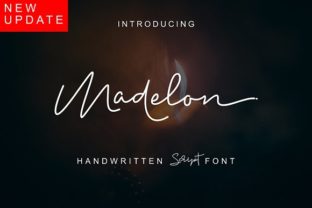
Choosing a typeface often comes down to balancing personality with practicality. You want something that looks distinctive but doesn't fight for attention. Madelon, a fresh, thin monoline font, sits neatly in that sweet spot. Its consistent stroke width and light visual weight make it a strong candidate for projects where clarity and elegance matter more than ornamentation.
Madelon is not a decorative display face meant for short bursts of dramatic text. It is a workhorse in its own quiet way, built for sustained reading, clean layouts, and scenarios where the content itself should lead. For anyone juggling multiple content formats, client work, or personal projects, understanding how to use Madelon effectively means understanding where a monoline font fits into a broader visual process.
What Makes Madelon Distinct in a Monoline Context
Monoline fonts share a single consistent stroke thickness across all characters. There are no thick-and-thin contrasts, no dramatic shifts in weight within a letterform. Madelon takes this principle and applies it with a deliberately thin stroke, which gives it a fresh, airy appearance. The result is a typeface that feels modern without being cold, and minimal without being sterile.
Because the stroke is uniform, Madelon works well at medium to larger sizes where its subtle details become visible. At smaller sizes, the thinness can challenge readability depending on the medium and background. This is not a flaw, but it is a constraint worth planning for. Knowing this upfront helps you decide where to deploy Madelon for maximum effect and where to pair it with a more robust companion typeface.
Before the Project: Planning with Madelon in Mind
When you start a new project, whether it is a brand identity, a publication layout, a presentation deck, or a website mockup, the typeface you choose influences every subsequent design decision. Madelon is best introduced early in the planning stage because its thin monoline character sets a certain tone: light, orderly, and refined.
Consider your content hierarchy. Madelon works beautifully for headings, subheadings, and short blocks of text that need to feel open. But if your project requires dense body copy at small sizes, you will want to plan for a secondary font with more weight and better readability. This pairing decision should happen before you start laying out pages or designing screens. Knowing that Madelon will carry the headlines and accent text while a complementary serif or thicker sans handles the body copy keeps your workflow smooth from the start.
For branding and identity work, Madelon can signal a brand that values simplicity, precision, and a contemporary aesthetic. It suits industries like fashion, beauty, creative services, wellness, and technology, where a clean visual language reinforces trust and professionalism. If you are developing a style guide, note where Madelon should be used and where it should not. Document these boundaries early, and you avoid guesswork later.
During Active Design and Content Creation
Once you move into the execution phase, Madelon becomes a tool for achieving visual consistency quickly. Because the stroke weight does not vary, you do not need to spend time adjusting letter spacing or kerning pairs as aggressively as you might with a high-contrast typeface. This saves time during layout and lets you focus on composition, color, and imagery instead.
When working with Madelon in design software, pay attention to the font size and line height. A thin monoline font benefits from generous spacing. Tight tracking can make the characters feel fragile, while adequate letter-spacing and leading let the type breathe. As a general rule, start with a line height of 1.5 to 1.8 times the font size and adjust based on the specific medium.
For web and digital projects, test Madelon at various screen resolutions. Thin strokes can appear faint on low-resolution displays or when reversed out of dark backgrounds. If your audience includes mobile users, check how the font renders on small screens. You may need to slightly increase the font weight or size to maintain legibility. Many platforms now support variable font properties, so if Madelon is available as a variable font, you can adjust the weight dynamically rather than switching to a different typeface altogether.
For print projects, Madelon excels in materials where thin, elegant lines feel appropriate: business cards, stationery, brochures, and lookbooks. However, ensure the printing method and paper stock can handle fine strokes. On uncoated or rough paper, thin lines can spread or appear uneven. A paper test before final production is a small step that prevents large disappointment.
After the Project: Maintaining Consistency Across Deliverables
Once a project is complete, the work often continues in the form of templates, style guides, and future iterations. Madelon, because of its clean and uniform structure, is relatively easy to maintain across a series of documents or digital assets. You can reuse the same type settings for months or years without the visual drift that sometimes happens with more complex typefaces.
If you manage a brand or a content library, store your Madelon usage rules in a central location. This includes font sizes, line heights, color values, and pairing fonts. When a new team member or collaborator needs to produce a document, they can reference these guidelines and produce output that feels consistent without starting from scratch.
Madelon also works well for templates used repeatedly, such as proposals, reports, email newsletters, or social media graphics. Its neutral but fresh appearance means it does not date quickly. A template built with Madelon today will still look current two years from now, which reduces the need for frequent redesigns.
Integrating Madelon with Other Tools and Resources
No font exists in isolation. Madelon interacts with the tools, platforms, and methods you already use. Understanding these interactions helps you integrate it smoothly.
If you use design tools like Adobe Creative Suite, Figma, Sketch, or Canva, check whether Madelon is available as a web font, a downloadable file, or a font library subscription. For team environments, ensure everyone has access to the correct font files and licenses. A common workflow breakdown occurs when one team member uses a different version or weight than intended. Centralizing font management through a service like Adobe Fonts, Google Fonts (if available), or a self-hosted library avoids these mismatches.
For developers and web designers, Madelon might need to be loaded via CSS with fallback fonts specified. Because thin monoline fonts are not universally available across all systems, define a fallback stack that preserves the overall feel. For example, a fallback of Helvetica Neue Light or a similar thin sans-serif keeps the visual intention intact even if Madelon does not load.
For content creators and bloggers, Madelon can be used in headers and pull quotes to create visual breaks in long articles. Pair it with a readable body font like Georgia or Merriweather for a classic but fresh combination. The contrast between the thin monoline header and the fuller body text creates hierarchy without needing extra graphic elements.
Practical Implementation Tips for Long-Term Use
Getting the most from Madelon means treating it as part of a system. Here are specific ways to make it work in your daily workflow:
- Test across media before committing. Always preview Madelon in the actual medium you will use. A screen test, a print test, and a test on different paper stocks reveal where adjustments are needed.
- Pair intentionally. Madelon pairs naturally with serif fonts for contrast or with thicker sans-serifs for a more uniform but layered look. Avoid pairing it with another thin monoline font, as the hierarchy collapses.
- Use color strategically. Because Madelon is thin, color choices matter. Dark text on a light background is the safest bet. If you use light text on a dark background, increase the font size and consider adding a subtle weight adjustment if the font technology allows it.
- Set spacing standards. Document your preferred letter-spacing and line-height settings for each use case. This turns a subjective visual choice into a repeatable rule, saving decision fatigue on future projects.
- Review at actual size. Zooming in on a screen can make any font look good. Always check Madelon at the size it will actually be read. What works at 48 pixels may look fragile at 14 pixels.
Organizing Your Font Library for Efficiency
If you manage multiple fonts across projects, organization becomes a productivity factor. Madelon, like any specialized typeface, should be tagged or categorized in a way that makes it easy to retrieve. Group fonts by weight, style, or intended use case. For example, create a collection labeled "thin sans-serifs" or "monoline fonts" so you can quickly compare options during the planning phase.
For small business owners and freelancers, keeping a lean font library reduces decision time. You do not need hundreds of fonts. A curated set that includes Madelon, a reliable body font, a display font, and a monospace option covers most scenarios. When a new project arrives, you already know your toolkit. This speeds up the early stages and leaves more energy for content and strategy.
For educators and bloggers who produce regular content, Madelon can become a signature element. Using the same font family across presentations, handouts, and online materials builds a consistent visual identity. Students and readers start to associate the clean look with your content, which reinforces recognition without needing a logo.
Quality Control and Consistency Checks
Before finalizing any project that uses Madelon, run a brief quality review. Look for these common issues:
- Characters that appear too faint at small sizes
- Uneven rendering across different browsers or devices
- Poor legibility when placed over busy backgrounds or images
- Inconsistent usage across multiple files or pages
A simple checklist reviewed before publication or print saves rework. If you are working with a team, include font-specific checks in your standard quality assurance process. Over time, these checks become routine and catch issues before they reach your audience.
Making Madelon Work for Your Specific Context
The value of any font ultimately depends on how well it serves your specific goals. Madelon is not a universal solution, but it is a versatile tool for anyone who values clarity, freshness, and a light visual touch. Whether you are designing a brand from scratch, building a content template, or refining a personal project, thinking through where and how to use Madelon turns a simple typeface choice into a deliberate part of your process.
Start by defining the role you want it to play. Is it the primary voice for top-level headings? Is it a supporting accent for quotes and captions? Is it the anchor for a minimalist brand identity? Once that role is clear, the practical decisions, from sizing to pairing to testing, become straightforward.
Madelon works best when it is used with intention, not as an afterthought. By integrating it early in your planning, testing it in real conditions, and documenting your usage rules, you turn a fresh thin monoline font into a reliable part of your workflow that delivers consistent results over time.