Eva Script: A Playful Hand-Drawn Font with Surprising Versatility
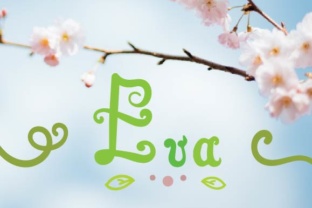
When you first come across Eva Script, it is easy to dismiss it as just another casual handwritten font. But this creation by Creatoria Designs deserves a closer look. Every letter in Eva Script is packed with small details that give it a lively, handcrafted feel while still remaining highly readable. That combination—personality plus legibility—is harder to find than most people realize. Whether you are a small business owner designing a logo, a blogger refining your site’s aesthetic, or a freelancer preparing client materials, Eva Script offers a distinct option that works across both print and digital spaces. However, like any design tool, using it effectively requires understanding what it can and cannot do. Many people make avoidable mistakes when choosing, purchasing, or applying this font. Those mistakes can lead to results that look chaotic, unprofessional, or simply less polished than they could have been. Let’s walk through the most common pitfalls and, more importantly, how to sidestep them so you get the most out of Eva Script.
Mistake 1: Judging Eva Script by a Single Preview Image
It happens all the time. You scroll through a font marketplace, see a preview of Eva Script, and decide in a few seconds whether it fits your project. That split-second judgment is often misleading. Font previews tend to show only a handful of letters, usually arranged in an ideal combination that flatters the design. You do not see how the full character set behaves—how the uppercase letters interact with lowercase, how punctuation fits, or how special characters and alternates work with one another. Eva Script is particularly vulnerable to this kind of snap judgment because its charm lies in the small quirks embedded in each letterform. A single preview cannot convey how those details accumulate across a paragraph or a headline. By relying on a thumbnail alone, you risk buying a font that, in practice, behaves differently than you expected. The fix is simple: dig into the full specimen sheet, look at actual word samples, and, if possible, test the font in your own design software before purchasing. Many reputable vendors let you type your own text into a preview. Use that feature. Evaluate how Eva Script handles common letter pairs and longer strings of text, not just the carefully curated display words.
Mistake 2: Overlooking Readability in Favor of Cuteness
Eva Script is undeniably cute. That is one of its strengths. But the same playful details that make it appealing can also hurt readability if you are not careful. Some hand-drawn fonts sacrifice clarity for character, making letters hard to distinguish at smaller sizes or in dense blocks of text. Eva Script does a better job than most playful fonts in this regard. Each letter is designed to be easy to read, which is a deliberate choice by Creatoria Designs rather than an accident. Still, it is a mistake to assume that just because a font is legible at one size, it will be equally readable everywhere. In print, a 12-point setting might look fine, but at 10 points, some of those cute details may blur or become distracting. On a screen, the same font can feel crisp on a high-resolution monitor but muddy on an older display. Before committing to Eva Script for a project, test it at the actual sizes and mediums you plan to use. If you are designing a poster where the text is large and bold, the font’s charm will shine. If you are writing a lengthy email newsletter body copy, you may want to reserve Eva Script for headings or accent text rather than running paragraphs. The goal is not to avoid using the font but to use it where it performs best.
Mistake 3: Ignoring Font Pairing Basics
Even a font as versatile as Eva Script cannot do everything alone. One of the most frequent missteps people make is pairing it with another font that clashes in tone, weight, or spacing. Because Eva Script has a hand-drawn, slightly irregular feel, it needs a partner that either complements those qualities or provides a clean contrast. Pairing it with another ornate or highly decorative font often leads to visual noise. Pairing it with a font that is too rigid or mechanical can feel jarring. A better approach is to choose a simple sans-serif or a neutral serif for body text, letting Eva Script take the spotlight in headings or callouts. For example, a clean humanist sans-serif like Source Sans Pro or a warm geometric font like Nunito can create a balanced relationship. The key is to test the pair together in real layouts, not just side by side in a grid. Look at how the two fonts interact in a paragraph with a subtitle, or in a button with a label. If the contrast feels forced or the spacing feels off, keep experimenting. Eva Script is forgiving enough to work with many partners, but you still need to invest a little time finding the right match.
Mistake 4: Neglecting Letter Spacing and Layout Adjustments
Hand-drawn fonts like Eva Script rarely sit perfectly in default spacing settings. The irregular edges and intentional quirks of each letter mean that auto-kerning may not handle every pair well. This is not a flaw in the font; it is a normal characteristic of handcrafted typefaces. The mistake is treating Eva Script like a rigid, geometric font and leaving spacing at default values without review. In a headline or a logo, you may need to manually adjust kerning between specific letters to avoid awkward gaps or collisions. In body text or longer phrases, tracking (overall letter spacing) might need a slight bump to improve readability. This is especially true when using Eva Script in digital environments where screen rendering can compress letters together. The fix is straightforward: after applying the font, zoom in and inspect the spacing at the actual output size. Make manual adjustments where needed. Most design software gives you fine control over kerning and tracking. Use it. A few minutes of spacing tweaks can transform a good layout into a polished one.
Mistake 5: Forgetting to Check Licensing and File Formats
It is easy to assume that buying a font once covers all your needs. That assumption leads to problems down the road. Eva Script, like most fonts from Creatoria Designs, comes with specific licensing terms. If you purchase a desktop license, you are typically allowed to install the font on a certain number of computers and use it in static images, print materials, and similar projects. But that same license may not cover web embedding, app use, or commercial distribution of the font file itself. Marketers and entrepreneurs who plan to use Eva Script on a website need a web license or a separate webfont kit. Freelancers designing a logo for a client should check whether the license allows for transfer or sublicensing. Educators creating digital course materials should verify what is permitted in interactive formats. The safest approach is to read the licensing details before you buy, not after you have already built your project. If the vendor’s site is unclear, contact them directly. A little upfront clarity saves you from legal headaches or the cost of repurchasing the font under a different license later.
Mistake 6: Downloading from Unofficial or Untrusted Sources
Everyone wants a good deal, but font piracy carries real risks that go beyond ethics. Unofficial download sites may offer Eva Script at a low price or even for free, but those copies often lack the complete character set, miss important kerning tables, or include modified versions that do not behave like the original. Worse, malicious files can be disguised as fonts, exposing your computer or network to security issues. Even if the file is clean, using an unlicensed copy means you are not entitled to updates, support, or the correct file format for your project. Creatoria Designs put real work into crafting every letter of Eva Script. Supporting that work by purchasing from an authorized vendor ensures you get the full, authentic version with proper spacing, all glyphs, and the details that make the font special. It also gives you peace of mind that your use is legitimate. If budget is a concern, look for genuine sales, bundle deals, or free fonts from reputable sources instead of resorting to unverified downloads.
Mistake 7: Using Eva Script in Every Project Without Considering Context
When you fall in love with a font, the temptation is to use it everywhere. That is natural. But even the most versatile fonts have limits. Eva Script is a playful, hand-drawn typeface, and that character may not suit every brand, audience, or message. A legal document, a financial report, or a medical brochure would likely feel mismatched with Eva Script’s tone. Similarly, if your brand identity is built on minimalism, precision, or high formality, this font might undercut that impression rather than enhance it. This is not a problem with the font itself; it is a matter of fit. The better approach is to evaluate each project on its own terms. Ask yourself whether the playful, approachable, handcrafted quality of Eva Script serves the content and the audience. If yes, use it with confidence. If not, keep it in your library for the right opportunity. Having a versatile font means knowing when not to use it, not just when to reach for it.
Eva Script from Creatoria Designs offers a rare balance between expressive hand-drawn charm and solid readability. It is well suited for print pieces like greeting cards, posters, and labels, as well as digital applications such as social media graphics, website headers, and email banners. But its success in any project depends on careful choices—how you pair it, how you space it, where you place it, and what license you have for it. By avoiding the common mistakes outlined here, you put yourself in a position to make the most of what this font offers. Test it thoroughly, pair it thoughtfully, and let its details shine without forcing them into places they do not belong. That approach will serve you whether you are a first-time font buyer or an experienced designer expanding your toolkit.