Sunse Fun: A Practical Guide to Getting the Most Out of This Playful Font
If you have spent any time browsing display fonts for creative projects, you have likely come across Sunse Fun, a lively typeface from Blessed Print that brings a cheerful, hand-drawn energy to headlines, branding, and digital content. At first glance, it looks simple enough—a rounded, bouncy font that seems to work well for anything casual. But like many display fonts with strong personality, using Sunse Fun effectively requires more thought than most people assume. Without careful planning, what could be a vibrant design element turns into something that feels chaotic, hard to read, or simply out of place.
This guide walks through the most common mistakes people make when selecting, downloading, and applying Sunse Fun. More importantly, it offers straightforward ways to avoid those missteps so you get the polished, engaging result you are after. Whether you are a blogger trying to build a recognizable brand, a small business owner creating social media graphics, or a hobbyist designing invitations, understanding these details will save you time, frustration, and probably a few redesigns.
What Sunse Fun Is and Why It Deserves a Closer Look
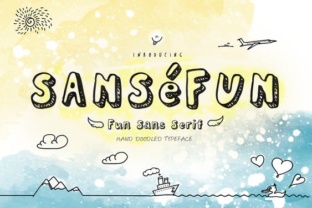
Sunse Fun is a decorative display font designed to feel approachable and energetic. Its letterforms are rounded and slightly irregular, with a hand-lettered quality that makes it stand out from more rigid, geometric typefaces. Blessed Print has positioned it as a font for projects that need warmth and personality—think event flyers, children's book covers, playful logos, and casual social media posts.
People are drawn to it because it feels human. In a world of polished, automated design, a font that looks like someone sat down with a brush pen and enjoyed the process is refreshing. That said, exactly what makes it appealing also makes it easy to misuse. The informal structure, varied stroke widths, and bouncy baseline can undermine readability if not handled with care. Understanding those trade-offs from the start helps you use Sunse Fun intentionally rather than just hoping it works.
Common Mistake: Treating Sunse Fun Like an All-Purpose Font
The biggest misunderstanding I see is people trying to use Sunse Fun for everything in a single project. They set headlines, subheadings, body copy, captions, and even navigation text in the same font, assuming that because it looks friendly, it should be applied uniformly. The result is almost always visual noise. Readers struggle to figure out what to read first, and the playful shapes that work at large sizes become distracting and hard to follow at smaller ones.
Why this matters for your results: When you use a highly expressive display font as your only typeface, you lose the hierarchy that guides a reader through your content. People may bounce away from your site or ignore your flyer simply because the layout feels exhausting to process.
A better approach: Reserve Sunse Fun for short, impactful text—headlines, callouts, or a single word that you want to emphasize. Pair it with a neutral, highly readable sans-serif or serif font for body copy. A clean pairing like Open Sans or Lato lets Sunse Fun shine without competing for attention. You get personality where it counts and clarity where it matters.
Overlooking Licensing and File Formats
Another overlooked detail is the licensing structure. Sunse Fun by Blessed Print is typically sold as a desktop license, which covers static images like print materials, logos, and social media graphics. But if you plan to embed the font on a website, use it in a mobile app, or include it in a product you sell (like a template or a printable), you likely need a different or extended license.
How this affects cost and compliance: Many creators do not realize they have violated a license until they receive a takedown notice or a bill for back fees. This is especially common among Etsy sellers, template designers, and bloggers who assume a desktop license covers all uses. The financial hit can be significant, and the stress of fixing it mid-project is avoidable.
What to check before you buy: Read the licensing terms on the Blessed Print website or wherever you purchase the font. Look for keywords like "web font," "app embedding," and "commercial use." If your use case is not listed, reach out to the foundry directly. Most type designers are happy to clarify or offer custom licensing. Spending five minutes on this now saves hours of headache later.
Mistaking Hand-Drawn Charm for Low Quality
Because Sunse Fun has an informal, hand-drawn appearance, some people assume it is a free, low-quality font that was thrown together without care. This is a misunderstanding that leads to genuine missed opportunities. Blessed Print has put real work into the spacing, alternates, and overall consistency of the typeface. When used correctly, it performs like a professional tool, not a novelty item.
Realistic example: A children's book illustrator used Sunse Fun for chapter titles and pull quotes throughout a 32-page picture book. She paired it with a simple sans-serif for the story text. The contrast gave the book a whimsical feel without sacrificing readability for young readers or parents reading aloud. Reviewers specifically mentioned the layout felt "warm" and "inviting." That is the kind of result you get when you respect what a display font can and cannot do.
Better mindset: Treat Sunse Fun as a specialized tool. It is not a jack-of-all-trades, and it was never meant to be. When you use it for the right job—short, bold, personality-driven text—it performs exactly as intended. When you shoehorn it into roles it was not designed for, it fails. That is not a flaw in the font; it is a mismatch in expectation.
Ignoring Spacing and Layout Adjustments
Display fonts often require manual tweaking that standard text fonts do not. Sunse Fun is no exception. The letterforms have irregular widths and varying heights, which means the default tracking and kerning may not look balanced in every word or phrase. If you set a headline without adjusting letter spacing, you might end up with awkward gaps or letters that feel crowded.
How this affects quality: A headline that looks slightly off—maybe the "n" sits a hair too close to the "s," or the capital "S" feels isolated—signals amateurism to viewers. They may not consciously notice what is wrong, but they will sense that something feels uneven. That subtle impression erodes trust in your brand or content.
Practical advice: After you set your text in Sunse Fun, zoom in and manually adjust the tracking for each headline. Most design software lets you kern individual letter pairs. Pay special attention to combinations like "AV," "WA," "To," and "Ly," where the shapes may create optical imbalances. If you are using a template, do not assume the default settings are optimized—they rarely are. Taking three extra minutes per headline makes a measurable difference in polish.
Downloading from Unofficial Sources
Because Sunse Fun is a paid font, some people search for free downloads on sketchy websites. This is risky on multiple levels. Unofficial versions often lack proper spacing, missing glyphs, or corrupted files that break your workflow. Worse, bundled downloads may include malware or tracking scripts that compromise your computer or your client's data.
How this affects your project: Spending hours troubleshooting a corrupted font file or dealing with a security issue is not worth the few dollars you saved. If you are a freelancer, infecting a client's system with malware destroys your reputation. If you are a business owner, you risk exposing customer information.
What you should do instead: Purchase Sunse Fun directly from Blessed Print or a reputable marketplace like Creative Market, MyFonts, or Fontspring. These platforms verify the files, support the designer, and provide clean, complete versions. If budget is tight, look for sales or bundle deals rather than resorting to illegal downloads. One legitimate purchase gives you peace of mind and a product that actually works.
Overcomplicating Pairings and Layouts
Another pattern I see is designers trying to make Sunse Fun "fit" a complex layout by adding multiple colors, textures, outlines, or shadow effects. The font already has built-in visual interest. Overlaying heavy effects often obscures the letter shapes and creates a muddy, cluttered result.
Example of what goes wrong: A small business owner designing a logo for a lemonade stand used Sunse Fun with a yellow gradient, a thick black outline, and a drop shadow. The final logo was nearly illegible at small sizes, and the charm of the hand-drawn letters was completely lost behind the effects.
A simpler, better approach: Let the font breathe. Use a single solid color that contrasts well with the background. If you want emphasis, try a subtle texture overlay on the background instead of on the type itself. Keep the layout uncluttered around your headline. The font does the heavy lifting—your job is to give it the space to do so.
What to Check Before Making a Final Decision
Before you commit to using Sunse Fun for a project, run through this short checklist:
- Readability at intended size. Set your sample text at the actual size it will appear. If it is hard to read from arm's length, reconsider using it for that element.
- License alignment. Confirm that your planned use—print, web, app, template resale—is covered by the license you are buying.
- Pairing test. Test Sunse Fun alongside your chosen body font. Adjust sizes and weights until the hierarchy feels natural.
- Glyph availability. Check that the font includes the characters you need, such as accented letters for multilingual text.
- File format. Make sure you download the correct format for your software (OTF is generally safest for most modern applications).
Taking these steps before you start designing prevents costly rework and ensures that the font serves your project rather than the other way around.
The Bottom Line on Sunse Fun
Sunse Fun from Blessed Print is a genuinely useful display font when approached with realistic expectations. It is not a workhorse that handles every text role, and it was never intended to be. Its strength lies in short, personality-rich applications where a handmade feel adds value. By avoiding the common mistakes outlined here—overuse, licensing oversights, spacing neglect, and download shortcuts—you put yourself in a position to get professional results without unnecessary frustration.
The designers who succeed with fonts like Sunse Fun are not the ones who use it everywhere. They are the ones who use it deliberately, pair it thoughtfully, and respect the craft behind it. If you keep that mindset, you will find that Sunse Fun becomes one of the most enjoyable tools in your creative kit.