Scribbler: A Rushed, Modern Handwritten Font for Real Projects
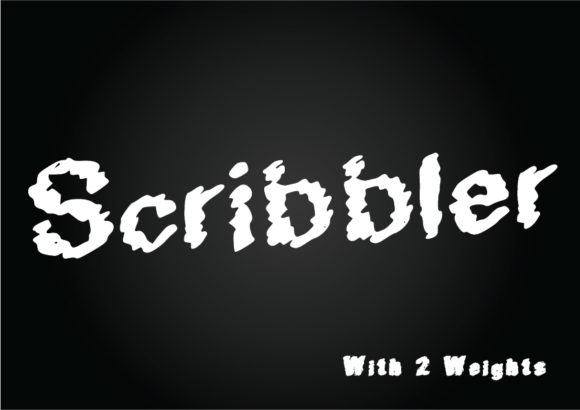
You know that feeling when you sketch out a quick idea on a napkin, and it captures exactly the energy you need? That's the spirit behind Scribbler. This isn't a polished, perfect script font designed to look like calligraphy. It's a modern handwritten typeface that embraces imperfection, speed, and a deliberately rushed aesthetic. The result is something that feels genuinely human—like someone sat down with a marker and let the letters fly. If you're tired of sterile, overly refined fonts and want your work to communicate energy and immediacy, Scribbler deserves a spot in your design toolkit.
Available in both Regular and Bold weights, this font comes packed with a full set of uppercase and lowercase letters plus numbers. The irregular stroke widths and slightly inconsistent letter shapes give it that casual, fun personality. It doesn't pretend to be neat. Instead, it leans into the quirks that make handwriting feel personal. Whether you're building a brand or just need quick social media graphics, that raw quality can be a powerful asset.
What Makes Scribbler Stand Out as a Creative Font
Most handwritten fonts fall into two camps: the neat, almost printed style or the wild, completely illegible scrawl. Scribbler sits right in the middle. The letterforms are clear enough to read quickly, but they carry enough bounce and irregularity to feel spontaneous. The Bold variant adds extra weight without losing that hand-drawn character, which makes it useful when you need emphasis or a stronger visual anchor.
Visually, this font has a modern typography feel that connects with younger audiences and creative industries. It's not nostalgic or retro. It doesn't mimic pencil marks or chalkboard textures. Instead, it looks like a permanent marker on a whiteboard or a felt-tip pen on a sketchpad. That contemporary edge makes it a strong choice for brands, small businesses, and content creators who want to project approachability without looking amateurish.
The numbers are particularly well executed. They maintain the same rushed, informal style as the letters, which matters when you're designing price tags, event dates, or infographic stats. Inconsistent sizing and baseline shifts give the whole character set a natural rhythm that's hard to achieve with more mechanical fonts.
Where Scribbler Works Best Across Projects
Think of Scribbler as a display font first. It's designed to grab attention in headlines, logos, and short text blocks. In editorial design, it can set the tone for a feature article or a magazine spread that wants to feel raw and unpolished. Pair it with a clean sans serif font for body copy, and you get a contrast that's both readable and visually interesting.
For branding and logo design, this font brings a friendly, handmade quality. Coffee shops, craft breweries, boutique clothing lines, and creative agencies all benefit from that human touch. A logo set in Scribbler feels like it was drawn specifically for that brand, not pulled from a generic template. That perception matters when you're building trust with customers.
Packaging design is another natural fit. Think product labels with handwritten ingredient lists, flavor names, or short taglines. The rushed look actually works in your favor here—it suggests authenticity and small-batch care. On social media graphics, the font stands out against the polished, templated look that dominates feeds. A quote card or announcement in Scribbler feels more like a personal note than a corporate post.
Web design projects benefit too, but use it sparingly. A headline hero section or a single call-to-action button can carry the personality without overwhelming the layout. Because it's a handwritten font, too much of it on a page can become tiring to read. Reserve it for moments where you want to create impact or emotional connection.
Even personal projects like event invitations, greeting cards, or product packaging for an Etsy shop can elevate their look with Scribbler. It adds a DIY charm without requiring you to actually hand-letter anything yourself.
How Scribbler Influences Readability and Brand Perception
Readability with a handwritten font always depends on context. Scribbler works well at medium to large sizes—24 points and above for print, or equivalent sizes on screen. At smaller sizes, the irregular strokes can start to blur, so stick to the Bold weight if you need smaller text. The font's visual hierarchy strength comes from its contrast with cleaner, more neutral typefaces. Use it as the anchor element in your layouts, and let a serif or sans serif font handle the heavy lifting for paragraphs.
Brand perception shifts dramatically with typography choices. A font like Scribbler signals approachability, creativity, and a bit of irreverence. It won't work for a law firm or a financial institution, but for a startup, an artist's portfolio, or a lifestyle blog, it builds an instant connection. The handwritten style tells audiences that you're human, you're not hiding behind corporate polish, and you value authentic expression.
Consistency is important even when working with a deliberately imperfect font. Stick to Scribbler for one or two specific roles in your brand identity—maybe just headlines and your logo. Don't try to use it everywhere. That way, the font becomes a recognizable design asset that reinforces your brand without creating visual noise. Over time, audiences will associate that rushed, energetic look with your voice, which builds recognition and loyalty.
Evaluate Project Fit Before You Commit
Not every project needs a handwritten font. Scribbler works when you want to convey speed, creativity, or a personal touch. If your project requires a more serious, established, or luxurious feel, look elsewhere. But if you're designing for a brand that celebrates individuality, imperfection, or youthfulness, this is a solid candidate.
Test the font in context. Pull it into your design software and try it at different sizes, in different colors, and on different backgrounds. The Bold weight is excellent for short, punchy statements. The Regular weight works for slightly longer headlines or subheadings. Print a sample or preview it on a real device before finalizing.
Font Pairing: Finding the Right Companions
Scribbler pairs best with neutral, clean typefaces. A simple sans serif font like Open Sans, Lato, or Montserrat provides the perfect counterbalance. The contrast between the script's organic flow and the sans serif's geometric clarity creates a modern typography framework that feels professional but not stiff. For a more editorial or classic look, try pairing with a serif font like Playfair Display or Merriweather. The serif adds structure and elegance, while Scribbler brings energy and personality.
Avoid pairing it with another handwritten or script font. The competition for attention will make the layout feel chaotic and hard to navigate. Stick to one star, and let everything else support it.
Licensing and Commercial Use
Before using Scribbler in client work, branded merchandise, or commercial projects, review the licensing terms. It's sold as a commercial font, which typically covers most business applications, but always double-check restrictions around embedding, redistribution, or use in logo trademarks. If you're a designer buying for a client, make sure the license covers their intended use. Many premium font licenses allow for a set number of users or projects, so factor that into your cost planning.
The font comes with both Regular and Bold weights, which gives you some flexibility out of the box. For most projects, that's enough. If you need more variation, you can manually adjust weight or spacing in your software, but the built-in Bold version handles emphasis well without modification.
Readability Considerations in Different Media
On screen, Scribbler reads best against a simple background—white, light gray, or a solid color. Busy patterns or photos behind it can cause the letters to get lost. Add a subtle shadow or outline if you need to place it over an image. In print, the font's uneven strokes reproduce well on matte or uncoated paper, which reinforces the handmade feel. Glossy paper might make it look a bit too polished, which defeats the purpose.
For accessibility, avoid using handwritten fonts for long body text or critical information like instructions or contact details. Reserve Scribbler for decorative or emphasis roles. That way, you preserve the creative energy while ensuring everyone can read your content easily.
Start by testing Scribbler on a few small projects—a social media post, a product label, or a logo concept. See how it feels in your hands. If the energy matches what you're trying to communicate, you'll quickly find more places to use it. The best fonts are the ones that make your work feel more alive, and Scribbler certainly brings that rushed, human spark to the table.