Triunfo Family: A Versatile Font for Creative Projects
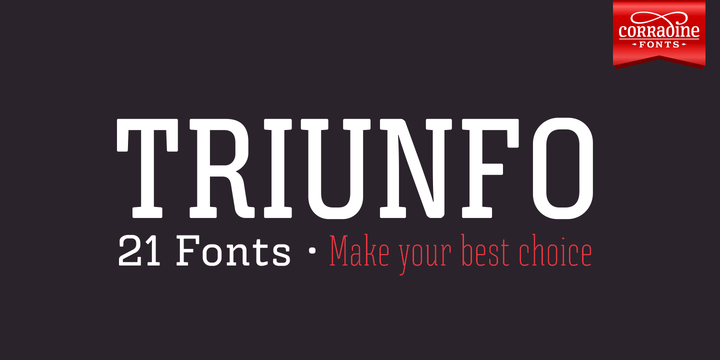
If you have spent any time browsing type foundries or font marketplaces, you have likely come across the name Triunfo. It is often described as a beautiful font family, and for good reason. The Triunfo Family offers a range of styles and weights that make it suitable for everything from bold headlines to delicate invitations. But just because a font looks great in a specimen sheet does not mean you can drop it into any project and expect perfect results. Many people—whether they are seasoned designers, small business owners, or hobbyists—make a handful of predictable mistakes when choosing or applying this typeface. Understanding these pitfalls will save you time, money, and frustration, and help you get the most out of this versatile family.
Why Triunfo Family Deserves a Place in Your Toolkit
Before diving into the common errors, it helps to understand what makes Triunfo stand out. This font family is designed with elegance and clarity in mind. Its letterforms balance classic proportions with a modern touch, making it equally at home on a book cover, a wedding invitation, or a poster promoting an art exhibition. The family typically includes multiple weights, italics, and sometimes even decorative alternates or swashes. That kind of breadth gives you a lot of creative room—but it also introduces complexity. Without a clear plan, you might use the wrong weight for the job or overlook the subtle details that separate a professional result from an amateur one.
Mistake #1: Using Triunfo for Body Text Without Checking Readability
One of the most frequent misunderstandings is treating Triunfo as an all-purpose typeface. Because it looks so polished in headlines, people sometimes try to set long paragraphs of body text in it. At small sizes, especially on screens, the thinner weights can become hard to read. The elegant serifs and fine strokes that look stunning at 48 points may blur or disappear at 12 points. The result is text that strains the reader’s eyes and frustrates your audience.
Better approach: Reserve the lighter weights of Triunfo for larger display applications. For body copy, consider using a more robust weight—if the family includes a regular or medium weight that remains legible at small sizes, test it first. Print a sample at actual size and read a paragraph. If your eyes feel tired after a few lines, choose a different weight or pair Triunfo with a highly readable complementary font (like a clean sans-serif) for body text. Remember, fonts are tools; using the right one for each job is the mark of a thoughtful designer.
Mistake #2: Overlooking the Importance of Spacing and Kerning
Triunfo’s beautiful letterforms can be undone by poor spacing. Many beginners assume that the default kerning in their design software is fine, but display fonts often need manual tweaking. When you use Triunfo for a headline or a logo, tight or uneven spacing can make the type look cluttered or amateur. Conversely, too much space between letters can destroy the rhythm of the word.
- What happens: Letters may clash (for example, an “r” and “n” combined can look like “m” if kerning is too tight).
- What to do instead: After setting your text in Triunfo, zoom in and adjust kerning for critical pairs—especially in headers, short phrases, or logotypes. Most design programs let you manually change the space between individual characters. Pay attention to combinations like “W” and “a”, “T” and “o”, or any letters with wide serifs or strokes. A few extra minutes of fine-tuning can elevate your entire piece.
Mistake #3: Ignoring Licensing and Download Sources
A surprisingly common error is downloading Triunfo Family from untrusted websites that offer “free” copies. While it is tempting to save a few dollars, these versions often miss essential features—like proper ligatures, alternate characters, or OpenType support. Worse, they might contain malware or come with licensing restrictions that prevent commercial use. Using an unlicensed font on a client project or product packaging can lead to legal headaches and damage your reputation.
Practical advice: Always obtain the Triunfo Family from an official foundry, a reputable marketplace, or a subscription service that includes commercial licensing. Check the license type: does it cover web use, embedding in apps, or using it on merchandise? If you need the full set of features (swashes, stylistic alternates, etc.), make sure the version you download includes them. Spending a bit more upfront is far better than having to replace a font mid-project or face a legal notice.
Mistake #4: Forgetting to Test Across Media and Sizes
You might design a beautiful poster with Triunfo on your high-resolution monitor, only to find that the same text looks blurry or too delicate when printed on a matte paper stock. Or the invitation that looked amazing on screen may lose its charm when viewed on a smartphone. This happens because display fonts can behave differently depending on resolution, ink bleeding, and substrate.
- Test early. When you consider using Triunfo for a project, create a mockup with your actual text and render it at the final intended size and medium.
- Print a sample. If the project will be physical, print a test on the exact paper or material you plan to use. Check how the fine hairlines and serifs hold up.
- Check on multiple screens. For web use, preview the font on different devices and browsers. Some CSS techniques (like font smoothing) can help, but the base font design must be readable even at small sizes.
This small step prevents the disappointment of discovering a problem after you have already committed to the design.
Mistake #5: Not Leveraging the Full Family
Triunfo is not just one font; it is a family. Yet many users download only one weight—usually the regular or bold—and never explore the rest. This limits your palette. You might miss out on an elegant italic for quotes, a lighter weight for subtle subheadings, or a condensed style for tight spaces. By sticking to a single weight, your work can feel flat and monotonous.
Better approach: When you purchase or license the Triunfo Family, take time to review every style included. Create a simple sample sheet with all weights and italics. Then experiment with combining them: use the heavy weight for a main title, the light italic for a subtitle, and the regular for body accents. This not only adds visual hierarchy but also shows that you are comfortable with the full range of the typeface. Your audience—whether clients, readers, or guests at an event—will appreciate the nuance, even if they cannot name it.
Mistake #6: Overusing Decorative Alternates
Triunfo sometimes comes with elegant swashes or decorative ligatures. These can make a single word look spectacular—for instance, on a book title or a formal invitation. But a common mistake is using too many of these flourishes in one piece. The result is a design that feels chaotic, hard to read, and self-consciously “fancy.” Less is almost always more when it comes to display features.
- What to check: Before applying a swash or alternate, ask yourself whether it adds meaning or just decoration. For example, a graceful swash on the first letter of a name can look refined; putting it on every letter in a sentence looks messy.
- Practical rule: Use decorative alternatives sparingly—usually no more than one or two per design element (a title, a logo, a heading). Let the beauty of the basic letterforms do the heavy lifting.
What to Check Before Making a Final Decision
When you are ready to use Triunfo Family in a real project, take a few minutes to run through this checklist:
- Readability: Is the weight appropriate for the size and medium? Have you tested it under real viewing conditions?
- Spacing: Have you manually adjusted kerning for key letter pairs?
- Licensing: Is your license valid for the intended use (commercial, web, print, etc.)?
- Consistency: If you are combining Triunfo with another font, do they complement each other without clashing?
- Feature access: Does your version include the alternates and ligatures you plan to use? Are they accessible via the OpenType menu?
Once you confirm these points, you can proceed with confidence. The Triunfo Family is a gorgeous asset when handled correctly. It can elevate a book cover, give personality to a poster, and add a touch of class to an invitation. The key is to treat it as a precise instrument: learn its strengths, respect its limits, and apply it with intention.
By avoiding the common missteps described here, you will not only produce better work but also save yourself the time and frustration of redoing a project. Whether you are a freelancer preparing a client proposal, a blogger designing a header, or an entrepreneur creating your brand’s first logo, thoughtful use of the Triunfo Family will help your message stand out for all the right reasons.