Mistletoe: A Versatile Handwritten Font Duo for Creative Projects
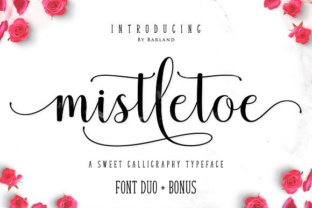
When you are searching for a typeface that feels both personal and professional, handwritten fonts often strike the perfect balance. Mistletoe, created by Barland, offers exactly that—a carefully crafted font duo that brings warmth and elegance to digital and print designs. Whether you are a graphic designer, a small business owner, or a DIY enthusiast, understanding what this font offers can help you decide if it fits your next project.
Mistletoe is not just one font—it is a duo. That means you get two complementary styles that work together seamlessly. The handwritten quality of this typeface gives it a natural, human feel that standard serif or sans-serif fonts often lack. At the same time, it maintains enough structure to remain legible and professional in a wide range of applications.
What Makes Mistletoe Different from Other Handwritten Fonts
Many handwritten fonts look charming at first glance but fall apart when you try to use them in real projects. They may lack proper kerning, have inconsistent character heights, or simply not scale well. Mistletoe addresses these issues with a polished design that still retains the organic imperfections that make handwriting appealing.
One of the standout aspects of Mistletoe is that it is a color font using Opentype-SVG technology. This means that within the font file itself, multiple colors and gradients are embedded. When you type in software that supports color fonts, you get vibrant, multi-colored lettering without needing to manually apply fills or strokes. This is especially useful for creating headlines, logos, or decorative text where you want an instant visual impact.
Because it is a duo, you can pair the two styles together—perhaps one for headings and the other for body text or accents. This gives your designs a cohesive but varied look without requiring you to hunt for complementary fonts elsewhere.
Who Can Benefit from Using Mistletoe
Mistletoe is designed for a broad audience. Here are some of the people and industries that may find it especially useful:
- Graphic designers who need a distinctive handwritten option for branding, posters, or social media graphics.
- Small business owners who create their own marketing materials and want a font that stands out without looking amateurish.
- Invitation and stationery designers working on wedding invitations, save-the-dates, or greeting cards where a personal touch matters.
- Crafters and DIY creators who use Silhouette or other cutting machines for vinyl signs, t-shirts, or home decor.
- Content creators and online sellers who need eye-catching text for thumbnails, product listings, or banners.
Because Mistletoe is a color font, it is particularly appealing for projects where you want a rich, finished look without extra steps. The embedded colors can save you time and help maintain consistency across different pieces of content.
Real-World Scenarios Where Mistletoe Shines
Imagine you are designing a series of social media posts for a boutique bakery. You want the text to feel warm and inviting, matching the handmade quality of the baked goods. Using Mistletoe for your headlines gives you an elegant handwritten look that feels authentic. The color font feature means you can use a soft pastel gradient or a rich burgundy tone directly from the font, depending on the season or promotion.
For a wedding invitation suite, Mistletoe can handle both formal and whimsical elements. The duo allows you to use one style for the couple's names and another for the event details, creating visual hierarchy while keeping a unified aesthetic. Because it is available as an Opentype-SVG font, the invitations you create in Photoshop or Illustrator will display the color details correctly, making your mockups and final files look polished.
If you run an Etsy shop selling custom wall art, Mistletoe can help you produce designs faster. Instead of manually coloring each letter, you can type out a quote or name and have the color already built in. This speeds up production and ensures that every piece has a consistent, high-quality appearance.
Compatibility: What Works and What Does Not
Understanding where Mistletoe works best is important. The font is available in OTF and TTF formats, but there is a key distinction to keep in mind:
- Opentype-SVG color font – This version is compatible with Photoshop, Illustrator, Silhouette, and Inkscape. In these programs, you will see the full color effect when you type.
- OTF and TTF files – These standard font files are not compatible with Cricut for color font usage. If you plan to use Mistletoe with Cricut, you will likely see only a single color version, or you may need to work around this limitation by converting text to paths or using a different approach.
For users of Silhouette, the color font support is good news. You can design directly in Silhouette Studio and see the colored letters, which is helpful for projects like stickers, labels, or layered vinyl.
If you are new to using color fonts, Barland offers an Ultimate Font Guide that walks you through installation and usage. Checking that guide before starting your project can save you frustration and help you get the most out of Mistletoe.
Strengths You Can Expect
Mistletoe brings several strengths that make it a worthwhile addition to your font library:
- Elegant handwritten aesthetic – It strikes a balance between refined and casual, making it suitable for both formal and friendly projects.
- Built-in color – The Opentype-SVG format saves time and adds visual depth without extra design work.
- Duo format – Having two complementary styles gives you flexibility and a cohesive look across different text elements.
- Wide software support – Works in major design programs like Photoshop, Illustrator, and Inkscape, as well as Silhouette for crafters.
- Professional polish – Unlike some free handwritten fonts, Mistletoe has careful spacing and consistent character shapes.
Considerations and Limitations to Keep in Mind
No font is perfect for every situation, and Mistletoe has some limitations worth noting:
- Not compatible with Cricut for color use – If you rely heavily on Cricut, you may need to adjust your workflow or use the font in a different way.
- Color font support varies by software – While Photoshop and Illustrator handle Opentype-SVG well, some older programs or simple text editors will not display the color. Always test in your target software before committing to a project.
- Handwritten style may not suit formal corporate branding – For very traditional or conservative industries, a handwritten font might feel too casual. Consider your audience and brand personality before choosing Mistletoe.
- File size and performance – Color fonts can be larger than standard fonts, which might affect performance in some applications, though this is rarely a major issue with modern hardware.
Being aware of these points helps you plan your projects realistically and avoid surprises down the line.
How to Evaluate Whether Mistletoe Is Right for You
Before purchasing or downloading Mistletoe, ask yourself a few questions:
- What software will I use? – If you work primarily in Photoshop, Illustrator, Silhouette, or Inkscape, you can take full advantage of the color features. If you use Cricut or a simpler text editor, consider whether the standard OTF/TTF formats still meet your needs.
- What kind of projects do I create? – Mistletoe shines in projects that benefit from a personal, elegant touch. If your work is mostly data-heavy reports or corporate documents, this may not be the best fit.
- Do I need a duo? – Having two matching styles can simplify your design process. If you often struggle to pair fonts, having a built-in duo can save time and improve consistency.
- Is color important for my workflow? – If you frequently apply custom colors manually, a color font might not add much value. But if you want quick, vibrant results, the built-in color is a significant advantage.
By thinking through these points, you can make an informed decision that aligns with your creative goals and technical setup.
Final Thoughts on Mistletoe
Mistletoe by Barland is more than just a pretty handwritten font. It is a carefully designed tool that brings elegance, warmth, and efficiency to a wide range of projects. Its color font capability, combined with the duo format, gives designers and creators a ready-made solution for adding personality to their work without extra effort.
Whether you are crafting wedding invitations, building a brand identity, or creating content for social media, Mistletoe offers a distinctive voice that stands out while remaining approachable. Just remember to check compatibility with your specific software and hardware, especially if you use Cricut, and take advantage of the Ultimate Font Guide if you need help getting started.
For anyone who values a refined handwritten aesthetic and wants the convenience of built-in color, Mistletoe is a compelling choice worth exploring.