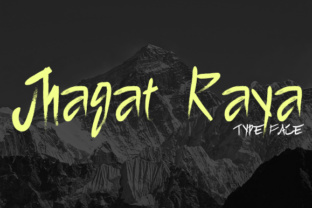
Jhagat Raya: A Hand-Painted Font That Demands Careful Use
You’ve spotted Jhagat Raya and immediately felt its magnetic pull. With bold brush strokes and an unmistakable hand-painted energy, it promises to inject personality into any project—and it delivers. But here’s the catch: fonts with this much character also come with a learning curve. Without a thoughtful approach, what could be the hero of your design can quickly become a distraction. In this article, we’ll walk through the most common mistakes people make with Jhagat Raya, and more importantly, how you can avoid them to make this font work for you.
Mistake #1: Using Jhagat Raya for Body Text
Jhagat Raya is a hand-painted font. It’s crafted to look like something a sign painter might have lettered by hand—raw, uneven, and full of life. That same quality makes it nearly unreadable when scaled down for paragraphs or small print.
Why it hurts your work: When readers have to strain to decipher letters, they stop reading. Legibility drops, and your message gets lost. For body text—anything below 16px or in long form—a cleaner, more neutral typeface is almost always the better choice.
Better approach: Reserve Jhagat Raya for headlines, pull quotes, logos, and short labels. Pair it with a simple sans-serif like Open Sans or Lato for the body. That contrast highlights the font’s personality without sacrificing readability. Try a sample: set a heading at 48–72px in Jhagat Raya and body copy at 14–16px in a clean companion font. You’ll see the difference immediately.
Mistake #2: Ignoring Hand-Painted Texture in Scaling
Because Jhagat Raya mimics natural brushwork, its strokes have irregular thickness and jagged edges. Scale it too small, and those subtle details vanish into a blurry mess. Scale it too large—especially for digital use—and the handmade roughness can look unintentionally messy rather than artistic.
What often goes wrong: A beginner downloads the font, sets a 24px heading, and finds the letters look “dirty” or “blurry.” That’s not a font defect; it’s a scaling mismatch. The hand-painted texture needs a certain minimum size to read properly, and also needs to avoid extreme upsizing that exposes unintended artifacts.
Practical advice: For print, use Jhagat Raya at sizes between 36pt and 96pt. For web, set it at a minimum of 30px in CSS. Avoid scaling it beyond 200% of its original design size; if you need a bigger headline, consider using a vector version or recreating the effect with a custom brush. Test your sizes on different screens or proofs before finalizing.
Mistake #3: Choosing the Wrong Pairing Fonts
Many designers pair Jhagat Raya with another display font thinking “more personality equals more impact.” The result is often visual chaos—two loud voices competing for attention.
The real cost: Your design has no clear hierarchy. Viewers don’t know where to look first, and the overall impression feels amateurish. For a brand or a blog, that undermines trust and professionalism.
Correct approach: Pair Jhagat Raya with a quiet, well-defined companion. A neutral sans-serif like Work Sans or a simple serif like Merriweather works well. The companion should handle all secondary text: subheadings, captions, and body. Let Jhagat Raya do the heavy lifting for the main message. For example, on a poster, the event name in Jhagat Raya, the date and details in a clean sans. That’s a classic combination that never looks cluttered.
Mistake #4: Assuming It Fits Every Brand or Project
Because Jhagat Raya is so striking, it’s tempting to use it everywhere—website headers, social media graphics, product packaging, even resumes. But a hand-painted font carries strong associations: rustic, artistic, handmade, sometimes vintage. Not every brand or message aligns with that personality.
Why it backfires: If you use Jhagat Raya for a corporate law firm’s logo or a medical clinic’s signage, the message becomes dissonant. Clients may interpret it as unprofessional or out of touch.
What to do instead: Before committing, ask: Does this font’s energy match the brand’s voice? For a craft brewery, a boutique bakery, a children’s book, or a creative workshop—yes. For a financial consulting firm, a tech startup, or a government website—probably not. Use the font as a strategic choice, not a default. If you love the hand-painted look but need something more neutral, consider a less extreme brush font. Jhagat Raya is not a one-size-fits-all solution.
Mistake #5: Overlooking Kerning and Letter Spacing
Hand-painted fonts like Jhagat Raya often have irregular side bearings—the space around each letter is not perfectly uniform. When you type normally, some letters may appear too close together while others float apart.
The effect on your design: In tight settings (like a logo or a short headline), uneven spacing can make the word look unbalanced. It can pull the reader’s eye or even change the meaning (e.g., “CL” might look like “C L”).
Fix it with manual adjustments: In most design software (Illustrator, Photoshop, Canva Pro, Figma), you can adjust kerning between specific letter pairs. For Jhagat Raya, pay attention to combinations like “A” and “V,” “T” and “o,” or “r” and “a.” Slight tweaks can tighten a gap or open a cramped letter pair. Also check overall tracking—often giving the word a few extra points of letter-spacing improves readability. For headlines, a tracking value of +20 to +50 (in CSS) can work beautifully. Test each word visually.
Mistake #6: Neglecting the License Before Downloading
Jhagat Raya is a commercial font. While you may find free versions, many are either trial versions with limited characters or unauthorized copies. Using an unlicensed font, especially for commercial projects, can lead to legal issues and poor quality.
What to check: Does your license allow web embedding? How about use in merchandise? Ebooks? Apps? Some licenses restrict the number of page views or require a separate license for each project. Overlooking these details can cost you later or force a redesign.
Better practice: Always buy from a reputable source (MyFonts, Creative Market, Fontspring, or the author’s site). Read the End User License Agreement (EULA). If you’re a freelancer, check if the license covers client work. If you’re a small business owner, confirm the font can be used in your logo and marketing materials. Investing a small fee upfront saves headaches down the road. And if you’re on a tight budget, look for a “personal use only” version—but understand you cannot use it for anything commercial.
Mistake #7: Forgetting to Test in Context
Maybe you’ve fallen in love with Jhagat Raya on the preview page. It looks incredible in the specimen. But how does it look on your actual website, printed at a small size, or on a dark background? The only way to know is to test.
Common oversight: Designers pick a font, build a whole layout, then realize it’s too heavy, too light, or the letters blend into the background. That’s a waste of time and effort.
A smart workflow: Before committing, create a quick mock-up. Type a headline in Jhagat Raya and drop it onto your planned background color. Check contrast—dark background with light text is fine, but the hand-painted edges may cause the text to look fuzzy if the contrast isn’t high enough. Print a sample if it’s for print. On screens, test at different resolutions. Also test in multiple browsers (Chrome, Safari, Firefox) if you’re using a web font. Make sure the font loads quickly and does not cause layout shifts. These quick checks can save hours of revisions.
Mistake #8: Overusing Special Characters and Alternates
Many hand-painted fonts, including Jhagat Raya, come with stylistic alternates, swashes, or ligatures. They add flair. But too many decorative elements in one word can make it illegible or cluttered.
The trap: You see a beautiful “Q” with a long tail and you use it in every Q. You activate all ligatures. The result is a text that looks like it’s trying too hard.
How to use them deliberately: Use alternates sparingly—one or two per headline at most. Let the core letterforms do the work. Ligatures can improve readability for certain pairs (like “Th”), but turn off ones that make letters merge into an unrecognizable shape. Most design apps let you manually choose which glyph to use. Treat alternates like seasonings: a pinch adds flavor, a handful ruins the dish.
Putting It All Together: A Quick Checklist
Before you deploy Jhagat Raya in your next project, run through this short list to avoid the common pitfalls above:
- Size: Is it used only for short, large text? (30px+ or 36pt+)
- Pairing: Did I choose a neutral, complementary font for body and secondary elements?
- Spacing: Have I manually adjusted kerning for problematic letter pairs, and set adequate tracking?
- Context: Did I test it on the actual background and platform where it will appear?
- Purpose: Does the font’s handmade, rugged character fit the brand or message?
- License: Did I purchase the correct license for my usage?
- Alternates: Am I using special characters with restraint?
Jhagat Raya is a wonderfully expressive hand-painted font. When you understand its strengths and limitations, you can use it to create designs that truly stand out—without falling into the traps that trip up so many. Take the extra time to plan, test, and pair it thoughtfully. Your audience will notice the difference, and your work will look better for it.